Automate operational processes with AI

The AI solution for teams in traditional industries

Automate back-office processes with AI

AI solution for teams in traditional industries

Watch our demo video
The problem

Manual processes are cutting your margins

Your team is wasting countless hours on processes like invoice processing, order handling, and capacity planning while errors pile up and customers wait.

AI could solve this problem, but current solutions are too complex, abstract, and don't integrate with your systems.

The solution

The smarter way to run your back office

Lleverage turns repetitive admin work into automated workflows so you can reduce costs, improve accuracy and free up your team.

Get more done with fewer people


Automation takes care of the repetitive work so your team can handle more without adding headcount.

Monitor performance of your AI workflows

24/7 operations


Your back-office processes should run before 9 am and after 5 pm, error-free. AI never needs to take a rest.

Stop paying for mistakes


Wrong numbers in an invoice or order mean wasted time, angry customers and lost money. With automation, you get it right the first time.

Dashboard showing total runs 238,284, average response time 243ms, system health 99.95%, LLM cost €130.53, error rate 0.03%, and a note about refining LLM prompts, with a multi-line graph below tracking data from December 30 to January 5.

How Lleverage works

We combine an easy-to-use automation platform with hands-on support so you get custom AI workflows designed, built, and embedded into your business without the hassle.

01

Build your workflow

Build your workflow

Define your solution

We start by mapping the process that costs you the most time and money. Together, we design the ideal automation for your business case.

User interface panel titled 'Context' with a prompt to add context to the workflow using variable link syntax, and a button labeled 'Generate legal compliance rules' with a hand cursor hovering over it.
02

Upload your documents

Upload your documents

Upload your documents

Add documents easily via email, web interface, or API.

Seven circular icons showing Google Drive, OneDrive, Dropbox, Notion, text, web, and document symbols.
03

Process and analyze

Process and analyze

Process and analyze

Let AI extract, analyze, and generate the outputs you need.

User interface card titled 'Give a task to an agent' displaying instructions for an AI legal assistant to analyze contracts, with options to search web or knowledge and a toggle to enable history.
04

Integrate with your systems

Integrate with your systems

Integrate with your systems

Send the results directly to your CRM, ERP, or email.

Search interface with tabbed filters showing integrations for sending data including HubSpot Leads, Slack Thread, Notion Article, SharePoint File, Gmail Email, and Dropbox File.

"It felt like having a dedicated partner. From a business perspective, Lleverage checks every single box"

Smiling young man with short dark hair wearing a blue checkered shirt against a plain light background.
Mart Kruidenier
Continuous Improvement Specialist - Koninklijke Dekker

How Lleverage works

Lleverage offers a one-to-one onboarding, from defining your first solution to integrating with your ERP.

01

Define your solution

Define your solution

Define your solution

We start by mapping the process that costs you the most time and money. Together, we design the ideal automation for your business case.

Four cards showing business automation tasks: Invoice Processing, Quote Generation, Order Processing, and Data Transformation, each with a brief description.
02

Build your workflow

Build your workflow

Build your workflow

Using the Lleverage platform, we turn that process into a working automation. Fast, simple, and tailored to your specific needs.

User interface card titled 'Search For Invoice Agent' describing searching invoice numbers across Business Central, SharePoint, Outlook, and Teams with listed goals and report summary details.
03

Test and refine

Test and refine

Test and refine

Getting 80% automated is easy. To reach 100% automation, we test in iterations until the workflow runs smoothly end-to-end.

Flowchart starting with 'Start with a form to collect inventory' leading to 'Extract inventory data from the file' and 'Route based on inventory file type,' all marked as success.
04

Integrate into your systems

Integrate into systems

Integrate into your systems

When the solution is complete, we embed the automation into your existing tools and back-office systems so it works where your team already does.

Search results for 'Send' showing integration options like Send Business Central Contact, Send Teams Message, Send SAP Invoice, and email and file sending actions.
Use cases

Processes you can start automating today

Table listing client names, deadlines, values, signed status, approval status, and associated ISO standards with icons of Excel, SharePoint, Outlook, and PDF above.

Handle incoming orders

Stop entering in orders by hand. Automate sales order creation so your team can process more with fewer errors and faster turnaround.

Chat interface showing a conversation where a user asks about their order status, provides order number and email, and receives a shipping confirmation with tracking link and expected delivery date.

Answer repetitive support queries

Give customers instant answers to routine questions. Automate common queries so your agents handle fewer tickets and focus on complex issues.

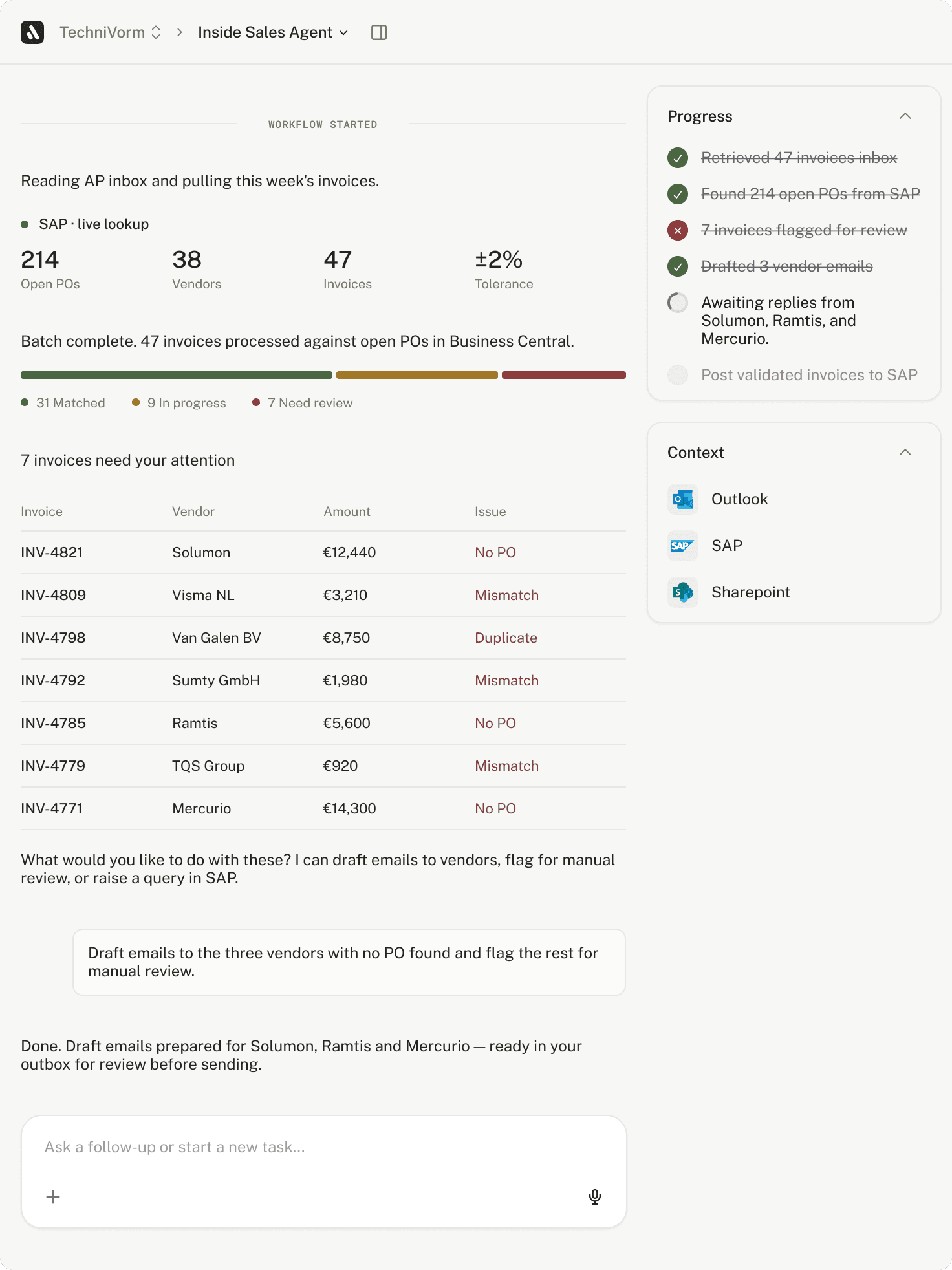
Diagram showing AI processing incoming email from James Cameron with attached invoices, listing invoice IDs, reporters, amounts, purchase orders, sources, and invoice counts.

Process incoming invoices

Cut out the manual matching and data entry. Automate invoice capture and validation to close faster and avoid costly mistakes.

Screenshot of a data transformation interface with a purple Run button and a table listing document requests, inputs, and outputs related to annual revenue sharing agreements and summaries.

Data transformation

Extract, process, and transform structured and unstructured data within automations. We handle inconstancies and complexity so workflows stay reliable

Wood Supply Quote from Oak & Timber Supplies Ltd to Mitchell Construction Ltd listing quantities and prices for oak beams, pine boards, and plywood sheets, including subtotal, VAT, and total cost.

Quote generation

Speed up your sales cycle and win more deals. Automate quote creation with accurate pricing and terms so your team can respond to opportunities faster and close more business.

Timeline chart showing sequential steps from 9:00 to 17:00 including Product Planning, Evaluation Capacity & Output, Investment & Capital, Raw Material Procurement, Job Process 1, Finished Goods, Packaging, and Distribution.

Production and capacity planning

Eliminate spreadsheet chaos and manual scheduling conflicts. Automate resource allocation and production workflows to maximize throughput and meet deadlines.

Automation without the hassle

You don’t need developers or expensive consultants. We set up your first automations with you and you stay in control with an easy-to-use platform built for non-technical teams.

Built for enterprise scale

Replace rigid automation and disconnected tools with one flexible, secure system that scales across your teams and processes.

Enterprise-grade security and compliance

Are you a builder?

Lleverage is the simplest way to get started with AI automation. Design, test, and deploy custom workflows with complete control. No advanced coding required.